TikTok is one of the hardest apps to put down, and deleting it rarely lasts. It's back on your phone the next time you're bored, because reinstalling takes less than a minute.
Screen Time can block TikTok at the system level, without any extra app. This guide sets it up so the block holds even when you want it gone.
Why TikTok's own limit doesn't hold
TikTok has a daily screen time limit in its own settings. When you hit it, you can enter a passcode you chose yourself or simply extend it. A limit you can switch off in the same app you're trying to quit won't hold for long.
Step 1: Set a temporary Screen Time passcode
Go to Settings > Screen Time > Lock Screen Time Settings and set a simple passcode like 1234. You'll replace it in Step 4. You need one now because the Block at End of Limit toggle only appears once a passcode exists.
Step 2: Add an App Limit for TikTok
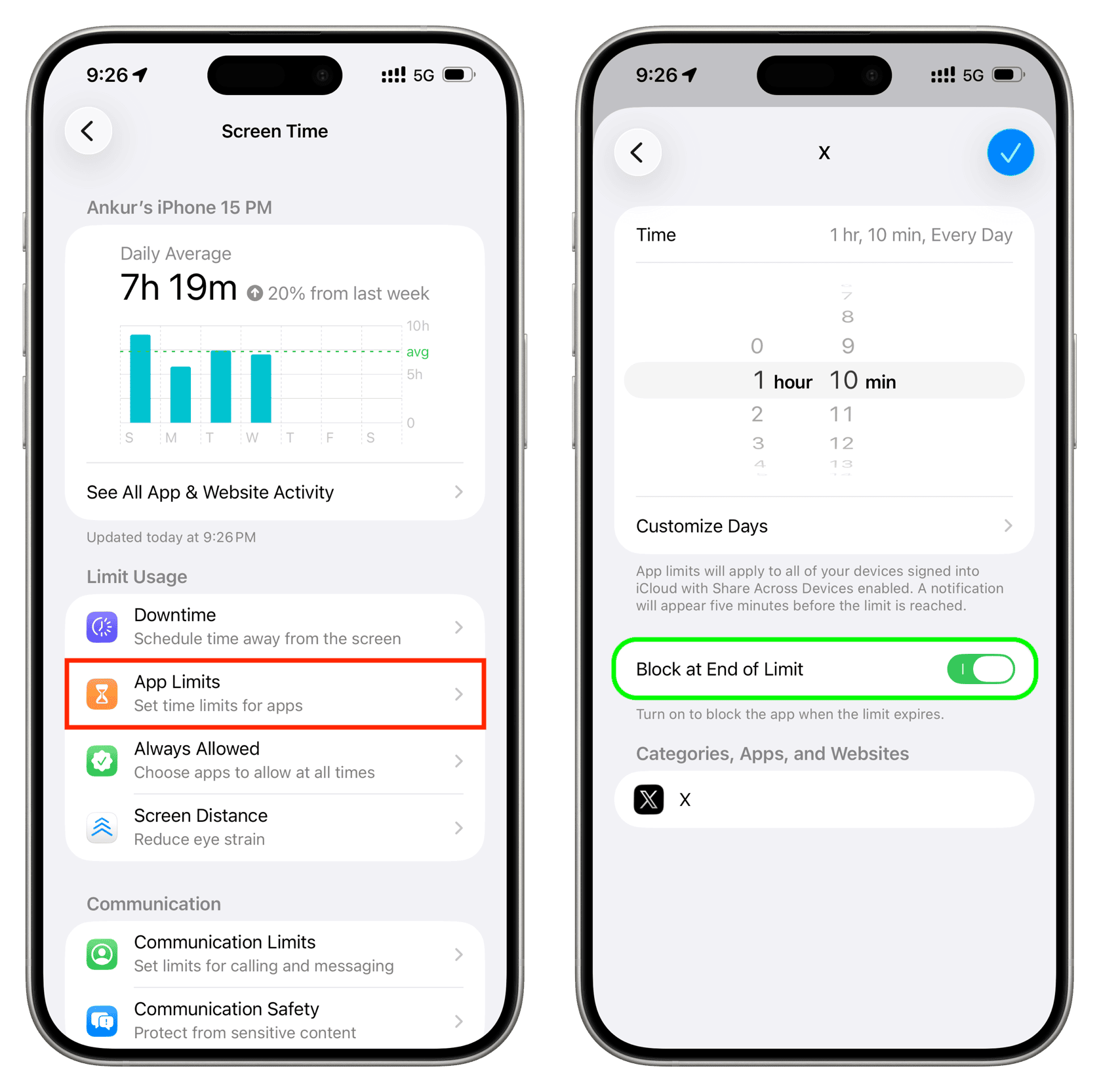
- Go to Settings > Screen Time > App Limits > Add Limit.
- Open Social and select TikTok.
- Set the time to 1 minute to block TikTok completely, or give yourself a small daily allowance like 15 minutes.
- Turn on Block at End of Limit. Without it, you get a One More Minute button you can keep tapping.
Step 3: Block TikTok in Safari
Once the app is blocked, the website is the next place you'll go. Go to Settings > Screen Time > Content & Privacy Restrictions > App Store, Media, Web & Games > Web Content, choose Limit Adult Websites, and under Never Allow add:
tiktok.comwww.tiktok.comm.tiktok.comvm.tiktok.com
vm.tiktok.com is the domain TikTok uses for shared links, so adding it stops videos friends send you from opening in Safari.
Step 4: Replace the passcode with one you don't know
You know 1234, so right now you can undo all of this in a few seconds. Replace it with a passcode you don't know. WaitToUnlock generates a random passcode, walks you through entering it under Change Screen Time Passcode without learning it, and only reveals it after a waiting period. Having a trusted friend or partner set it works too.
Then close the recovery loophole: iOS lets you reset a Screen Time passcode with your own Apple Account unless you set things up carefully. Here's how to disable that.
Should you delete TikTok too?
You can, but it isn't necessary. With a 1-minute limit and Block at End of Limit on, the app stays on your phone but won't open. Some people find it easier to leave it installed and blocked, because there's nothing to reinstall when the urge hits.
Common questions
Can you block TikTok on iPhone without an app?
Yes. Add an App Limit for TikTok in Screen Time, set it to 1 minute, and turn on Block at End of Limit. Add tiktok.com to Safari's Never Allow list so the website is blocked too.
Why doesn't TikTok's own screen time limit work?
Because you control it. When the limit hits, you can enter your own passcode or extend it from inside TikTok, which is the app you're trying to stop using.
How do I stop myself turning the TikTok block off?
Protect Screen Time with a passcode you don't know. Use WaitToUnlock or have a friend set it, and remove your own Apple Account from passcode recovery.